
Executive summary
The shared mailbox is one of the most important operational systems in most fund administrators, prime brokers and corporate service providers, and nobody designed it. It has no owner per request, no state, no rules about who may do what, and no reliable record of how work was done. Firms run regulated client service on it because it was there.
That was barely tolerable when the only actors were people. It becomes unacceptable when every person in the team also has an AI assistant. Copilot, consumer chatbots and coding agents can now read a shared inbox, draft replies and pull data from other systems. But the AI's involvement is recorded, if at all, against the individual user, not against the client request. There is often no case record to tell you or the auditor how the case was handled by humans or increasingly AI.
This paper argues three things:
- Shared mailboxes are an uncontrolled environment by design. Folders, flags and colour categories are being used as a workflow engine, and they cannot answer the basic questions an auditor or client will ask.
- Personal AI assistants multiply the problem. Each person's AI usage becomes a private, invisible layer of work on top of an already ungoverned system: different prompts, different answers, different data, and no shared evidence.
- The fix is governed execution, not a ban. Every request becomes a case with an owner; every AI action runs as a scoped task; and every step, human or AI, lands on the case record.
We close with five questions any COO or CISO can ask of their own shared mailboxes before their next audit.
1. The most important system nobody designed
If you were asked to design a system for handling regulated client requests, you would start with a few non-negotiables: every request has an owner, a status and a deadline; people can only do what their role allows; every action is recorded against the request; and nothing is lost when someone is off sick. A shared mailbox meets none of these.
Yet in most fund administrators, transfer agents, prime brokers and corporate service providers, addresses like investor.services@, clientops@ or kyc@ are where the work actually lives. They grew organically: one inbox became a team inbox, folders were added for each fund, colour categories came to mean "in progress" or "waiting on client", and a spreadsheet appeared on the side to track what the inbox could not.
What this looks like day to day:
- Ownership by convention. Typically a line manager or team lead scans the inbox and allocates work by forwarding, flagging or dragging emails into people's folders. In between, operations staff pick things up themselves. Whether that means "I'm on it" depends on who you ask.
- State held in people's heads. Read, unread, flagged and categorised are personal, fragile signals. One person opening an email can make it look handled to everyone else.
- Everyone can do everything. Full access is the default. Any member can reply, forward, delete or move any message, including messages outside their remit.
- The thread is the record. History lives in reply chains, side conversations in personal inboxes, chats and phone calls. The full story of a request is rarely in one place.
- Work slips through. Duplicate replies, missed follow-ups and requests that sit unnoticed under a busy thread are routine, not exceptional.
This is not a criticism of the people. Operations teams are extraordinarily good at making an unsuitable tool work. The point is that the tool itself provides no control, so every control is manual, informal and invisible.
2. The control gaps: what an auditor asks versus what a mailbox can answer
A simple test reveals the problem. Take the questions a client, auditor or regulator routinely asks about a single request, and try to answer them from a shared mailbox alone.
| Question | What a shared mailbox can tell you |
|---|---|
| Who owned this request, and when did they pick it up? | Possibly who flagged or moved it, if mailbox auditing is configured and the logs are still retained |
| Was it answered within the agreed SLA? | Only by manually reconstructing timestamps across threads |
| Which requests are still open right now? | Nothing reliable: "unread" and "flagged" are not states |
| Who was allowed to send this reply, and did anyone check it? | Nothing: send rights are mailbox-wide and review is invisible |
| What evidence was the answer based on? | Nothing: lookups in other systems leave no trace on the email |
| Was any of the work done by AI? | Nothing (see section 3) |
| If the person who handled it leaves tomorrow, can someone else pick it up? | Only if they happened to write it down somewhere |
Email platforms do offer mailbox auditing, and it helps. But it records mailbox events, such as a message opened, moved or sent as the mailbox. It does not record work: what the request was, who was responsible, what was decided, or why. Firms end up stitching together PowerShell exports, a tracking spreadsheet and people's memories to answer questions that a purpose-built system would answer in one click.
For regulated firms this is more than an efficiency issue. Under SM&CR, Consumer Duty and equivalent regimes, being unable to show how a client request was handled is itself a weakness of systems and controls.
3. AI arrives without a record
Into this ungoverned environment, AI has arrived through three doors at once.
Door one: the sanctioned assistant. Since April 2026, Microsoft 365 Copilot Chat in Outlook works directly inside shared and delegated mailboxes, summarising threads and drafting replies. It is a genuine productivity gain. But Microsoft's own documentation is clear about where the record goes: Copilot conversations started from a shared mailbox are tied to each user's primary account, and other users of the same mailbox cannot see each other's Copilot history. The AI's contribution belongs to the individual, not to the client request.
Door two: the unsanctioned assistant. Deloitte's 2026 GenAI Workforce Survey of 25,000 UK workers found that 31% of people using GenAI at work do so without their employer knowing. Even in financial services, where firms provide more approved tools than most sectors, 19% of GenAI users still pay for their own. In operations teams, that means client correspondence pasted into consumer chatbots to draft replies, with no record anywhere in the firm.
Door three: the home-made agent. Technically confident teams are now wiring general-purpose coding agents and scripts directly to mailboxes through APIs. A technically minded team member with a general-purpose coding agent or a low-code automation tool can build an "inbox bot" in an afternoon. It works, until nobody can say what permissions it holds, which model it calls, or what it did last Tuesday.
All three doors lead to the same place: the AI's involvement in a case is not on the case.
| What you need to know about AI on a request | Where it lives today |
|---|---|
| Was AI used at all? | Unknown, unless the person chooses to say |
| Which tool and model? | In the individual's personal or corporate account, or nowhere but rarely connected to the case |
| What did it see (emails, attachments, other systems)? | In the individual's chat history, or nowhere |
| What did it suggest, and what did the person change? | Lost once the draft is pasted into a reply |
| Who approved the AI-assisted answer? | Indistinguishable from any other reply |
The client sees a reply from clientops@. Internally, nobody can tell whether it was written by an experienced operations professional, drafted by Copilot and checked, or generated by a personal chatbot and sent unread.
4. When everyone has an assistant, the wild west multiplies
Personal AI assistants are designed to make an individual more productive. A shared mailbox is a team process. Putting the first on top of the second creates five distinct risks.
- Inconsistent answers. Ten operations staff with ten assistants and ten prompting styles will give the same client ten different versions of the same answer. There is no shared definition of how a request type should be handled.
- Invisible data movement. An assistant grounded in a shared mailbox can read whatever that mailbox holds. A personal chatbot can receive whatever someone pastes into it. Neither is scoped to the request in hand.
- Unverifiable output. A draft that cites a NAV, a settlement date or a balance looks equally convincing whether the figure came from the system of record or was invented. Without evidence linked to the draft, the reviewer has to redo the lookup or trust it.
- Agents with standing access. Home-made inbox bots tend to be given broad, permanent mailbox and API permissions. They read untrusted email from outside the firm, which makes them a target for prompt injection, the risk we examine in our companion paper Every Email Is Now an Instruction.
- No learning loop. Because AI use is private, the organisation cannot see which request types AI handles well, where people override it, or where it fails. Every individual's improvements stay with that individual.
Bans do not solve this. Surveys this year consistently show that a large share of employees continue to use AI even where policy forbids it. The pressure is real: operations teams face rising volumes and tight SLAs, and AI genuinely helps. The question is not whether AI is used on the shared mailbox. It is whether that use happens inside a system that can see it, scope it and record it.
Case study: the off-channel communications sweep. Financial services has seen this problem before. Over several rounds of enforcement, US regulators fined firms whose staff did business on personal messaging apps that the firm did not capture. By early 2024, SEC and CFTC fines for off-channel communications and recordkeeping failures had passed $2.6 billion. In August 2024 alone, 26 firms paid a combined $392.75 million, and each was also charged with failing to supervise its staff.
Two lessons carry over directly. First, policy was not a defence: the firms had rules prohibiting unapproved channels, and the SEC found they failed to enforce them. Second, the firms that fared best had provided an approved, captured alternative and reported their own gaps. Personal AI on a shared mailbox is the next off-channel problem: the business gets done, but the record of how it was done sits somewhere the firm does not control.
5. What you would design instead: governed execution
Start from a blank page and the design writes itself. Requests become cases. Cases have owners. AI does defined work inside the case, not alongside it. And the case record captures everything, human or machine.
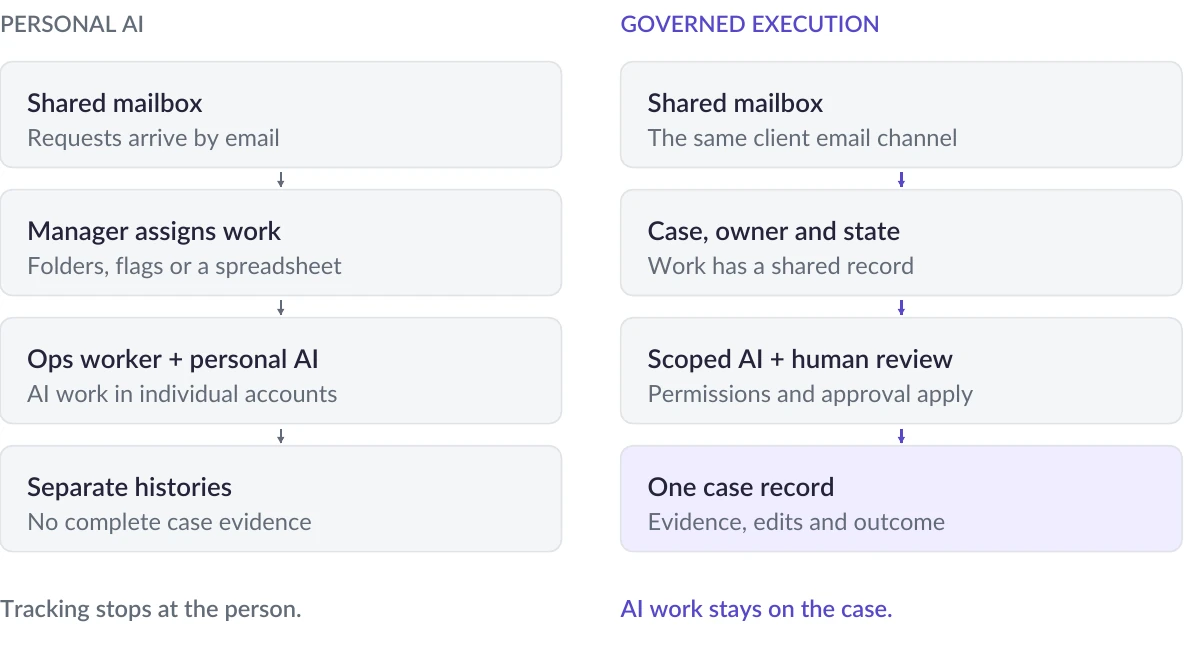
On the left is the setup we see in the wild: a line manager allocates work from the shared mailbox and tracks who is doing what, often in a spreadsheet on the side. That tracking stops at the person. Whatever AI each ops worker then uses leaves its trace in their own account, so the manager can see who handled a request but not how it was handled. On the right, the AI's work is one recorded step inside the case.
We call this governed execution. It rests on five principles:
- Every request becomes a case. Incoming email and attachments are captured, classified and linked to a client, a case and its history the moment they arrive. The mailbox stays as the channel; it stops being the system.
- Every case has one owner and a state. Ownership, status, deadline and dependencies are explicit and visible to the whole team, not implied by flags and folders. Tasks for other people, departments and agents are tracked within it.
- Permissions follow the process, not the mailbox. Who can reply, approve, escalate or release is defined per request type and role. Full access to an inbox no longer means authority over every request in it.
- AI works as a scoped task on the case. Instead of each person prompting their own assistant, AI is given a defined task ("prepare the transaction status response for case 1042") with only the tools, skills and data that task needs and asks the responsible human when it should.
- Everything lands on the case record. The request, the evidence retrieved, the AI's actions, what the reviewer changed, who approved it and what was sent: one record, readable by anyone who needs it, retained under the firm's own policies.
The difference is not that AI is used less. It is that AI use becomes a property of the process rather than a private habit of each user.
6. How Jaid puts the inbox and the AI on the case record
Jaid was built for exactly this environment: high-volume client correspondence in fund administration, prime brokerage, private credit and corporate services. Its principal application, the Agentic Case Manager, sits on top of the shared mailboxes teams already use. Clients keep emailing the same addresses; what changes is what happens next.
| Shared mailbox today | With Jaid |
|---|---|
| Email lands in a pile; someone notices it | Automated intake identifies the request, extracts key details and links it to the right client and case |
| Ownership by flag or folder | Clearly defined task ownership and automated assignment, with dependencies and handoffs tracked |
| Anyone with access can send anything | Permissions and approval points defined per workflow |
| Personal AI assistants, history in individual accounts | AI works as a governed task on the case, using only permitted tools and data |
| AI drafts are indistinguishable from human ones | Every AI action, the evidence it used and its draft are recorded on the case, marked as AI work |
| Review happens, or doesn't, invisibly | Reviews, edits, actions in outside systems and decisions are recorded alongside the case |
| SLA and backlog reconstructed by hand if at all | Live view of case progress, workloads and service deadlines |
Two design choices matter most for the problems in this paper.
AI that knows the domain. Jaid's models are trained on each client's operating language, request types and rules. That means consistent classification and routing across the team, instead of ten individuals prompting ten assistants differently. One client's director told us Jaid's models identify incidents and access problems more accurately than their human agents.
AI that is accountable by default. In Jaid, AI never works off the record. A draft reply or action carries its evidence and its provenance; it stays a draft until the process says otherwise; and the person who approved it is recorded. When a client or auditor asks how a request was handled, the answer is on the case.
The results show up in the operation as well as in the controls. A prime brokerage client reduced missed client requests and follow-ups by 80%. An asset manager answers regulatory enquiries 97% faster. Clear Street's head of operations noted that they had rejected heavier service-desk platforms because of the administrative overhead, and that Jaid removed that blocker.
7. Five questions for your next operations review
Pick one shared mailbox and one request from last month. Then ask:
- Can we show who owned it, when, and whether we met the SLA, without reconstructing it by hand?
- Can we list every request in this mailbox that is open right now, with an owner against each?
- Do we know whether AI was used to answer it, which tool, what it saw, and what the person changed?
- Do we know every AI tool, bot or automated flow that can read or send from this mailbox, and what permissions each one holds?
- Could a new joiner pick up the case tomorrow from the record alone?
If the honest answer to any of these is "not really", the mailbox is running the operation, rather than the other way round. That is the starting point for governed execution, and a single workflow is enough to begin.
Conclusion
Nobody would design a shared mailbox as the control system for regulated client service. It became one by accident, and operations teams have carried the cost in manual effort, missed requests and audit scrambles ever since.
AI could make that accident permanent. Layer personal assistants and home-made bots onto an ungoverned inbox, and you get faster work with even less visibility of how it was done. Or AI could be the moment firms finally fix it: by turning the inbox into a channel, every request into a case, and every AI and human contribution into a recorded, reviewable step on that case.
That is what Jaid does. We would welcome the chance to take one of your shared mailboxes and one workflow, and show you what it looks like with the record intact.
Sources
- Microsoft Support: Shared and delegated mailboxes with Copilot Chat in Outlook (updated August 2026)
- Deloitte GenAI Workforce Survey 2026: Shadow AI (fieldwork May to June 2026)
- Bloomberg Law: SEC's recordkeeping fines offer lessons to compliance officers (March 2024)
- 401(k) Specialist: SEC fines 26 firms nearly $400 million for recordkeeping failures (August 2024)
- Reed Smith: SEC charges ten firms with recordkeeping failures (October 2023)
Contact: success@jaid.io